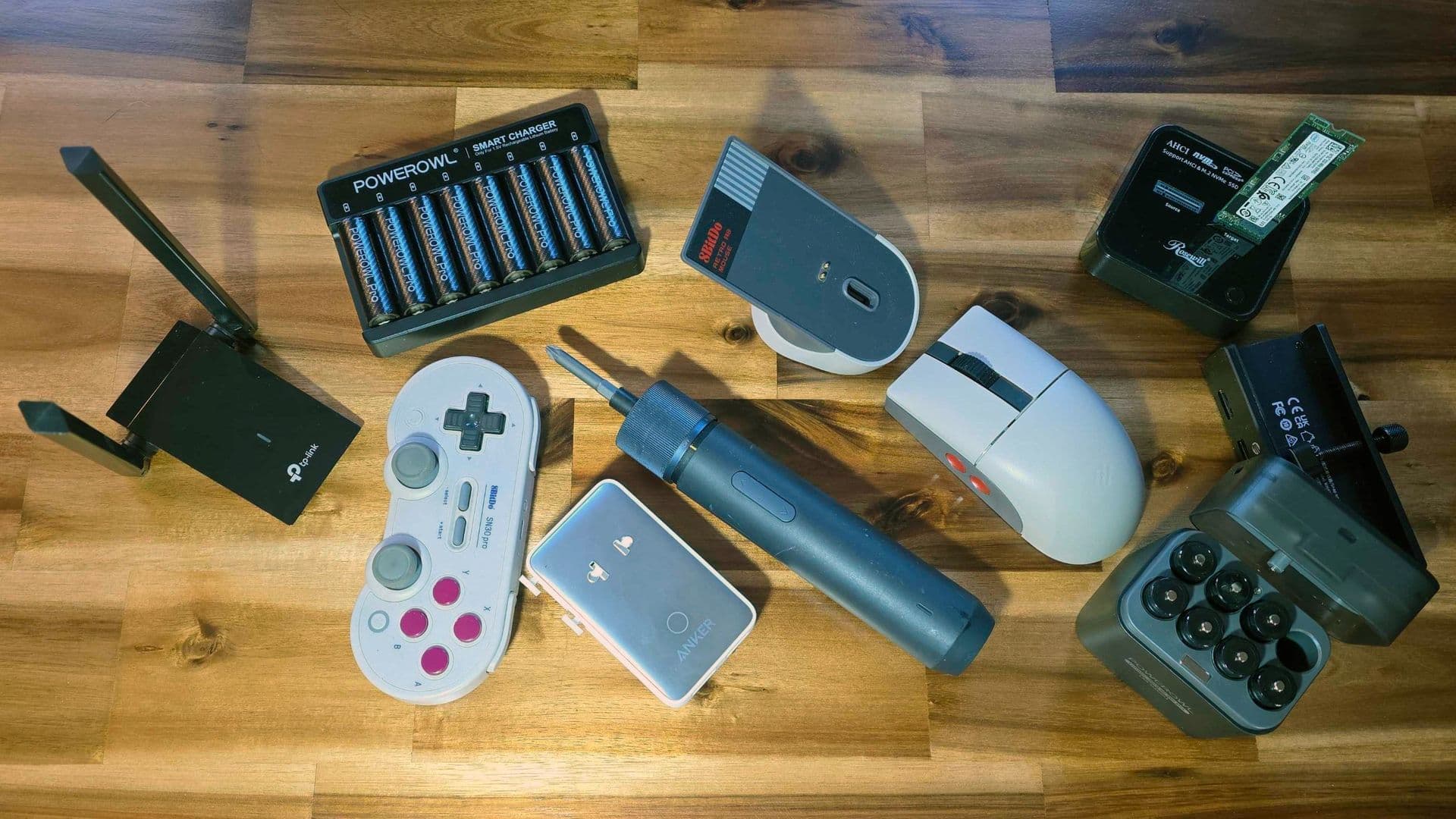
As much as I love high-priced tech like my RTX 4090-equipped custom gaming rig or the 65-inch LG OLED TV I use as my monitor, most of us can't afford to spend several hundred dollars or more on a tech gift, no matter how important the recipient might be in our lives. But you can still improve the tech lives of your friends and family (or yourself) while spending a comparatively small amount of money during the Black Friday deals season.I own all of the affordable devices listed below, and they all typically sell for less than $50. Some are even under $20! All of these products have made my tech-saturated world a little lighter, brighter, or just plain nicer in their own way. If you're looking for a small tech splurge for yourself, or an affordable gift for that tech-savvy friend or family member, one of these $50-or-under options might be a good fit and a great deal while Black Friday deals keep their prices lower than normal.My favorite $50 dealsRosewill M.2 SSD Cloner ($49.99)Hoto Electric Screwdriver Kit ($29.98)8BitDo Retro R8 Mouse with Charging Dock ($49.99)Become an IT hero with Rosewill's M.2 SSD Cloner(Image credit: Amazon)Last year, a family member asked for help with an older desktop PC that was struggling to run Windows 10 and several programs on a cramped 110 GB SSD. I figured I could clone the boot drive onto a more spacious drive, so the OS and programs had more space to stretch out.But the thought of juggling multiple USB enclosures or having to take the drive home and shuffle it in and out of my desktop filled me with dread, as I pictured hours spent getting everything done and the system back up and running. So I looked into getting an M.2 SSD cloner and was surprised to see they can be found for less than $50.NVMe SSD Cloner: was $37.99 now $32.29With support for NVMe M.2 SSDs and offline cloning, this handy device makes it simple to move your files or OS from one drive to another. And with a 20 Gbps USB-C interface, it's also speedy in your OS of choice if you want to use software to clone or move your data between drives.View DealWhile I don't love the glossy plastic shell of Rosewill's cloner, it's one of the more affordable options. And it supports both NVMe M.2 drives and older AHCI models (Sorry, SATA). Using the cloner is pretty straightforward. You plug in the included USB-C power adapter, put your source drive in the left slot, the destination drive in the right slot, press the power button on the back, and a few logos light up, letting you know you're ready to go. Press the clone button on the top, and the drive cloning will commence (provided your destination is the same size or larger than your source).That's assuming you want to do an offline clone. But because I needed to also resize the partition between the old 110 GB and a newer Team Group 512 GB SSD, I used the second included USB-C cable to connect the Rosewill cloner to my laptop and powered up the device. Within seconds, both drives were recognized in Windows, so I fired up the excellent free DiskGenius software, cloned the old partition to the new drive with a few clicks, and then used the software to drag the boot partition to the full size of the new drive. The whole process took just a few minutes, since the Rosewill cloner supports 20 Gbps USB, and I wasn't exactly copying a huge partition. When the cloning process was finished and the partition expanded, it was hard to believe it was all that easy. I had expected to be at the task for hours, but I was done in less than 30 minutes. Sure, unless you're in IT, a drive cloner might not be something you use regularly, but it's sure handy to have around when you need it. You could also use it to save some money by buying a laptop with a cramped SSD and swapping in something much roomier – provided, of course, the laptop's storage isn't soldered to the motherboard. The Rosewill cloner is also handy for just checking the contents of old M.2 drives you may have lying around. But if that's all you need, you can buy an NVMe enclosure or a single-drive dock. I also own a version of this model from Suitok, which costs $15.99.This tiny, cheap, magnetic, USB-charging flashlight is great for PC building and other everyday tasks(Image credit: Tom's Hardware)I picked up the OLIGHT IMINI 2 mini flashlight last year on impulse because it looked well-designed and cost around $20, but it's often on sale for much less. Its simple design and built-in USB-A plug for charging make it fun to use – just pull the back off, and it turns on. The magnet at the back lets you easily mount it anywhere you need a little extra light. I've used it inside a steel PC case while fiddling with RGB wires, and under my sink while attaching a glass rinser.Imini 2 EDC Rechargeable Keychain Flashlight: was $19.99 now $11.99At just 2.17 inches long, this flashlight is rated to 50 lumens, and it sports a magnetic back with a USB-A plug for charging. Pulling the back off turns on the flashlight, and the magnetic back makes it easy to mount the light on anything made of ferrous metal.View DealThe OLIGHT IMINI 2 is also small enough for your keychain, is designed to live with your keys, and includes two silicone covers for the USB port and a little carabiner clip. But the flashlight portion is only held to the charging port via a magnet, and I feel like (for me, at least) it would likely fall off and get lost before too long if left on my keys.I've used the HOTO 3.6V Screwdriver Set to build dozens of PCs(Image credit: Hoto)I build a lot of PCs, though not as many lately thanks to the RAM apocalypse, and I also do regular home improvement work around my apartment. So a cordless screwdriver is a nice thing to have. I also own a much slimmer Wowstick, but have found HOTO's NEX O1 Pro to be much more useful thanks to its extra (and variable) torque. It's great for loosening those factory-installed screws on PC cases that just don't want to let go, and also good for assembling furniture.The HOTO won't replace my DeWalt drill for bigger, tougher jobs. But for everyday tasks, it's powerful enough, easy to charge over USB-C, and even looks good on my workbench.NEX O1 PRO 3.6V Screwdriver Set: was $49.99 now $28.48Hoto's wireless screwdriver has three torque settings, charges over USB-C, and looks surprisingly good. It's even proven quite durable, as I've dropped it off of ladders and my workbench at least a dozen times over the past few years, and it's still working flawlessly.View DealCheap USB media control box makes PC volume and track control a more tactile, retro experienceFor those of us who grew up in the 1900s, few things beat a chunky tactile volume knob and physical buttons for controlling media. And Vaydeer's USB device provides that, and then some. I own the previous version of this device, and love it for controlling and muting music at my treadmill desk while I work. I use the buttons on it to play / pause audio and video and move forward to the next track or backward to the previous one. It's totally plug-and-play, as no drivers are needed.Volume Control Knob + Media Buttons: was $31.99 now $27.19Just plug this simple USB device into a USB port and you can control the volume and select tracks without fiddling with your keyboard or mouse.View DealBring a retro SNES feel to modern gaming with 8Bitdo's SN30 Pro wireless Bluetooth controllerWhat's not to love about a SNES-inspired wireless gaming controller that's compatible with Windows, Mac, Android, and the Nintendo Switch? Not much, as far as I'm concerned. Especially considering it's not super expensive.As you might expect, given the SN30 Pro's small size and many more buttons than the SNES controller it was based on, its Rumble motors aren't the strongest. And the layout can feel a little cramped for some modern games. But for any retro game, and especially platformers, this is my go-to controller. It feels familiar and nostalgic, which, for me at least, goes well with those occasional long game sessions.SN30 Pro Bluetooth controller: was $44.99 now $33.19With its SNES-inspired design, this controller will entice gamers of a certain age. But its appeal goes beyond its looks, with Hall Effect joysticks and support for the Switch 1 and 2, PC, macOS, and basically any OS that supports games and Bluetooth.View DealRetro looks meets modern specs in this NES-themed mouse from 8BitDoThere are so many gaming mouse options, most with specs that go well above and beyond my wrist-twitching capabilities. So I instead chose something with style that caught my eye, 8BitDo's Retro R8 Mouse with Charging Dock. This NES-inspired mouse is designed for nostalgia, with its black, gray, and red color scheme and round red side buttons. And 8BitDo went the extra mile (or two) by designing a weighted charging dock (with its own NES-like touches) and a spot for the 2.4 GHz dongle. This is the kind of extra feature that's more common in mice that cost twice as much.Retro R8 Mouse with Charging Dock: was $49.99 now $37.96The nostalgia of this mouse's design is nice. But it also sports a 26,000 DPI sensor, 4K polling, and a really nice charging dock that also houses the 2.4 GHz dongle. If you're in a pinch or not gaming, Bluetooth is also supported. View DealUnder the hood, you get a decent 26,000 DPI sensor and 4K polling (plenty for us non-esports gamers), an ambidextrous design with two side buttons on either side, and a clicky, rubberized scroll wheel. The side buttons, which are concave, took a little getting used to for me. But they are also so distinctive that now I miss them while I game using other mice. If the NES theme isn't your thing, the company also sells a translucent-green XBox version, as well as a champagne-hued C64 Edition.Never run out of USB ports with this powered 11-port hubIf you're like me, you never have access to enough USB ports. I solved this problem by picking up this Ikai hub, with 60W of power for your external drives and peripherals, and a premium metal shell. It sports three speedy 10 Gbps ports (two USB-C), along with seven 5 GBps USB-A ports. The final USB-C on the end of the hub is for charging your phone or other devices, and delivers 20W.The other nice feature is that all the data ports have a side button, so you can toggle them on and off to save some power. I also find this handy for swapping between wireless mice and keyboards, while keeping the tiny dongles plugged in so I don't lose them. 11-in-1 Hybrid USB Hub: was $49.98 now $39.99With 11 ports and up to 10 Gbps of bandwidth, a solid aluminum shell, and buttons so you can cut power to individual ports you aren't using, this USB hub is a great addition to your desk. It has external power for better stability and even a 20W USB-C PD port on the end for charging phones or peripherals.View DealThe sole thing to keep in mind about this (and basically any) hub, is that it has a single 10 Gbps connection to your PC. So don't expect to plug in multiple high-speed devices (like SSDs) and have them run simultaneously at full speed. If that's what you need, you should look at one of the best Thunderbolt or USB4 hubs (which cost significantly more).Add recessed power and USB charging ports to your desk for under $20(Image credit: Tom's Hardware)OK, this one's only for the DIY-inclined, because it involves cutting a rectangle in your desk (or anywhere else you might want some flush-mount power ports, like a nightstand). Jgstkcity's recessed power strip lets you drop a couple of AC outlets and two USB charging ports (one 30W USB-C) anywhere you need them – again, once you've cut a hole for it.It is, of course, smart to be cautious of no-name power accessories and strips. But I've used two variations of these strips for roughly three years now, and nothing has ever felt hot or failed. I have this model installed in the narrow stand I built that lives right behind my couch, up against the wall. It's a super-convenient place for power outlets, especially when friends or family stop by. I just warn people not to put drinks near there. Thankfully, the coffee table, in front of the couch, is an even more convenient place for those. Recessed Power Strip: was $19.99 now $15.99You'll probably need a drill and a saw to install it, but having a couple of power plugs and USB-C PD power right on the surface of your desk or nightstand is super convenient. And once you have the hole cut, this strip is dead-simple to install. View DealStay charged and save space while traveling abroad with Anker's slim Nano Travel Adapter(Image credit: Tom's Hardware)When you're traveling to another country for more than a few days, every small bit of space you can save helps. But you also usually need a travel adapter to plug your devices into the outlets of other countries. Anker's Nano Travel Adapter serves both needs well, as it's roughly half the thickness of other adapters and is designed to work in over 200 countries. The Nano Travel Adapter also has four USB ports for charging, which is super convenient for keeping my phone, e-reader, and earbuds juiced up without needing a separate charger. There are two USB-A ports on the bottom and two USB-C ports on the side, with the latter delivering up to 20W. The adapter also comes in black or white/silver. I opted for the white one, which makes it easier to find after months in a drawer when I'm not traveling.Nano Travel Adapter: was $25.99 now $19.99Anker's slim travel adapter is 43% smaller than many other adapters, while supporting over 200 countries with its fold-down plugs. It also has two USB-C and two USB-A ports for charging, at up to 20W. View DealThe major downside over other travel chargers is that the Nano Travel Adapter doesn't support plugging in devices with three-prong (grounded) plugs. But I haven't found this an issue since I typically plug things like my Baseus flat laptop charger in while traveling, rather than high-power devices like a desktop PC or hair dryer. Give your wrists (and elbows) a fresh resting spaceFor anyone who spends their days (and/or nights) in front of a keyboard, a good wrist rest is key for both short-term comfort and long-term limb health. And having stumbled onto these combo wrist and elbow rests earlier this year, I never want to use anything else.Even if you have a wrist rest you've been using for years, there's a good chance it's a little funky or the fabric is worn out. Gel and fabric rests only tend to last a few years before they get funky, so even if you don't quite need a new one now, it's nice to have a replacement waiting in the wings.L-Shaped Elbow Pad and Wrist Rest: was $19.99 now $15.99These unique wrist and elbow rests are designed to hang over the edge of your desk, which makes them a great option for people who lean on their elbows or if you just have a cramped desk setup. Available in multiple colors and sizes, the 11.8-inch version is wide enough that I use one for my compact keyboard at work, and the other at home for my gaming setup.View DealLithium rechargeables are great for high-drain devices, and this 8-AA set with charger is just $27(Image credit: Tom's Hardware)After the good experience I've had with the company's NiMH batteries, I bought Powerowl's Lithium rechargeable batteries earlier this year. And boy am I glad I did. These last months longer in my smart door locks than those older batteries, which means I only have to swap the cells on two doors a few times a year now.Full disclosure: I have had one of these batteries refuse to recharge after its first power cycle. But out of the three sets I now own, that's not a terrible track record. I just wish the company also made AAA lithium cells for my other devices.1.5V Rechargeable Lithium AA Batteries 8 Pack with Charger: was $29.99 now $23.99These 1.5V lithium batteries are designed for high-drain devices and rated at 3600 mWh. The charger plugs in over USB-C and can also charge older NiMH batteries.View DealTP-Link's AX1800 WiFi 6 USB Adapter delivers Wi-Fi 6 to older devices over USBHave you upgraded your router to Wi-Fi 6 or later, but your desktop or laptop doesn't have the requisite hardware to take advantage of your recent network tech? TP-Link's AX1800 WiFi 6 USB Adapter is here to solve that problem for you. It's quite large by USB Wi-Fi dongle standards, but I've found it works quite well with my Wi-Fi 6 router.I have the router running downstairs from my office, and it instantly fixed an issue I was having with very poor reception from the SFF PC I built in the Fractal Terra case.AX1800 WiFi 6 USB Adapter: was $34.99 now $19.99Sure, it's big and bulky with two antennas, but this Wi-Fi 6 USB adapter can deliver some serious speed to your desktop or laptop when paired with a Wi-Fi 6 or later router.View DealOrico USB 3.0 Clamp Hub is easy to mount on many desksThis is a four-port, 5Gbps USB-A hub that's designed to clamp onto your monitor or desk and give you extra convenient connectivity.It comes in black or silver and has a nice, sturdy metal frame. Just note that its clamp section is pretty shallow, and its adjustable screw can only open between 10 and 32 mm, so it won't fit on all monitors or desks.USB 3.0 Clamp Hub: was $15.99 now $14.99An otherwise standard four-port USB 3.0 hub, this Orico model stands out for its metal frame and clamp design.View DealClean up the cables under your desk with a trayIf you to get a handle on the PC cables in your home or office, some cheap cable management trays will do the job. This two-pack comes with tape, though heavier loads will ultimately require some screws.Besides the trays, this kit also comes with cable ties and a few cable clips you can place along the bottom or sides of your desk. One of these has been holding up the PC cable clutter in my living room for the past year. But I had to screw it into my desk because it's holding an Anker power strip, plus the large external power brick from my TV / Monitor.2-Pack Under Desk Cable Management Tray: was $38.99 now $23.99If there's a rat's nest of cables under your desk, attaching some trays down there can help you clean it up. This set has tape for light loads, but for longer-term cleanliness, you probably want to consider screws.View DealKeep a fast charging cable with your keys(Image credit: Tom's Hardware)You may, like me, be swimming in a world of USB cables. But that doesn't mean you always have one when you need it away from home. This short 240W USB4 charging cable from EndlesShine solves that by being small enough to attach to your keys. It's not always the most convenient option, at just over 5 inches long, but it will do in a pinch and has come in handy more than once, particularly on trips when I'm traveling light.USB Cable 5.11" Short Type C 240W USB 4.0 Keychain Cord: was $11.99 now $6.79It's short in length, at 5.11 inches, but this keychain cable supports 240W charging and USB4 (40Gbps speeds). Clip it onto your keys, and you'll always have a fast cable when you need one.View DealIf you're the type who is rough with your keys, the plastic cap may wear out over time, so you might want to just keep the cable in a pocket or your bag. It even comes in white and yellow if you don't like basic black.Download the Tom's Hardware app for up-to-the-minute updates on iOS and Android. If you're looking for more savings, check out our Best PC Hardware deals for a range of products, or dive deeper into our specialized SSD and Storage Deals, Hard Drive deals, Gaming Monitor deals, CPU deals, Gaming PC deals, RAM combo deals, 3D printer deals, RAM deals, Gaming laptop deals, Wi-Fi Router deals, GPU deals, Gaming chair deals, PC building tool deals, PC peripherals deals, filament and resin deals, motherboard deals, CPU cooler deals, PC case deals, Dell and Alienware deals, USB charger deals, and laptop PC deals pages.* The listed previous prices can vary based on retailer, as many use different metrics, like 90-day rolling averages or ‘estimated value’ due to ongoing shortages and price hikes.
15 tech gadgets that improved my tech life are on sale for less than $50
From electric screwdrivers to high-res webcams, these are inexpensive game-changers.
Editor
Nov 26, 2026 · 20 min read
Source: Matt Safford
From other categories

Security
North Korea-Linked PolinRider Poisons Over 7,600 GitHub Repositories to Spread Malware
just now·1 min

Mobile Development
Last call for Amazon UK's top Black Friday deals: flagships, foldables, mid-rangers and more
just now·1 min

Databases
Grand Team Assemble: Percona Meet-up at Phuket
1h ago·10 min

Operating Systems
DXVK 3.2 Adds Present Timing Support for More Consistent Frame Pacing on Linux
1h ago·1 min

AI & Machine Learning
Quoting Jack Despain Zhou
3h ago·1 min

Programming Languages
Episode 76 “Java in the Age of AI” [AtA]
18h ago·1 min